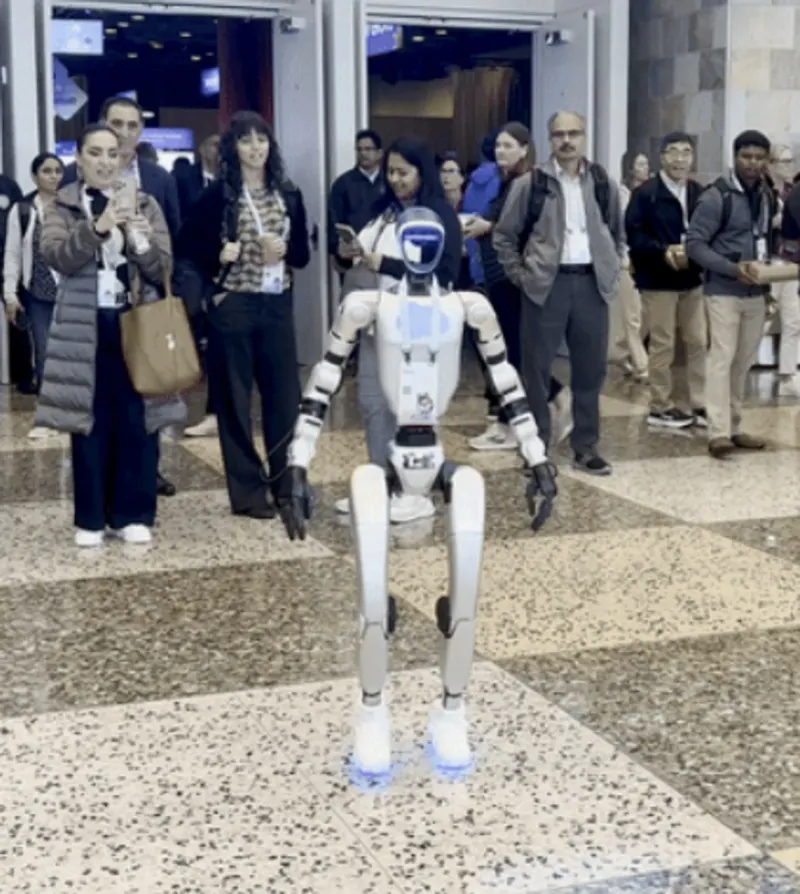
Henry
Last updated:
Henry is a software demonstration robot platform utilized by Salesforce at Dreamforce and TDX to showcase cloud-based Agentforce autonomous AI agents interacting in physical environments. Salesforce does not manufacture proprietary robotics hardware; Henry serves as a demonstrator for enterprise AI agent integration.
Quick Overview & Key Facts
Henry is a humanoid robot made by Salesforce in United States, launched in 2024 and built for conversational query answering, live CRM data retrieval, and conference attendee engagement.
- Dimensions
- 90 cm x 60 cm x 140 cm
- Weight
- 75 kg
- Top speed
- 1.5 km/h
- Battery runtime
- 6 hours
- Charging time
- 3 hours
- Sensors
- Camera, LiDAR, ultrasonic sensors, force-torque sensors
- Operating environment
- Indoor and outdoor use, temperature range -10°C to 45°C
What Can Henry Do?
Core operational tasks and activities demonstrated or performed by Henry.
Real-World Applications of Henry
Industries, working environments, and deployment suitability for Henry.
Henry Capabilities
Inherent physical, perceptual, and cognitive abilities built into Henry.
Download Media Cards
Story CardExport high-resolution story cards summarizing Henry's operational tasks, real-world applications, and capabilities.
Robot Specifications
Values without a Confirmed badge are compiled from public sources and may not be manufacturer-verified.
Not yet published by Salesforce: warranty terms, safety certifications, EMC compliance, IP rating, noise level, expected lifespan, maintenance schedule, firmware version and 7 more.
Robot Timeline
Key milestones in this robot's development and rollout
Salesforce shows Henry, a humanoid robot powered by its Agentforce platform, greeting attendees at Dreamforce in San Francisco.
Source: Axios ↗
More Humanoid Robots
Discover more robots in the same category




Robots From Other Categories
Discover complementary robots from different categories that work well together
Frequently Asked Questions
Get answers to common questions about this robot
Q1. How to troubleshoot Henry?
Troubleshooting Henry involves checking power connections, ensuring proper Wi-Fi connectivity, and reviewing system logs for errors. If issues persist, contact Salesforce support.
Q2. How to set up Henry?
Setting up Henry involves connecting it to a power source, linking it to Wi-Fi, and configuring it through Salesforce's AI interface.
Q3. What are Henry's primary use-cases?
Henry is designed for interactive demonstrations and customer engagement, often used at events like Dreamforce.
Q4. How to operate Henry?
Henry is operated through Salesforce's AI chatbot interface, allowing users to command it via voice or text inputs.
Q5. How to maintain Henry?
Maintenance involves regular cleaning, checking for software updates, and ensuring all mechanical parts are functioning properly.
Q6. What safety features does Henry have?
Henry likely includes safety features such as collision detection and emergency shutdown, though specific details are not publicly disclosed.
Q7. How does Henry handle different surfaces?
Henry is designed to navigate various surfaces, likely using sensors to adjust its movement accordingly.
Q8. How to clean Henry?
Cleaning Henry involves using a soft cloth to wipe down its exterior and avoiding harsh chemicals.
Q9. How does Henry navigate?
Henry navigates using advanced sensors and AI algorithms to detect and respond to its environment.
Q10. What are common Henry problems?
Common issues might include connectivity problems, software glitches, or mechanical malfunctions.
Q11. How to reset Henry?
Resetting Henry typically involves powering it off and on or using a specific reset command through its AI interface.
Q12. How to control Henry?
Henry is controlled through voice commands or text inputs via Salesforce's AI chatbot system.
Q13. How to connect Henry to Wi-Fi?
Connecting Henry to Wi-Fi involves selecting the network from its settings menu and entering the password.
Q14. What is Henry's warranty?
The warranty details for Henry are not publicly disclosed and should be checked with Salesforce directly.
Q15. How to update Henry's software?
Software updates for Henry are likely managed through Salesforce's platform, with notifications provided when updates are available.
Rating and Reviews
Share your experience and help others decide!
Loading...
User Reviews
No user reviews. Be the first one to review!
User Comments (No Login needed)
Share your thoughts, experiences, or questions about this robot.
Comments appear after moderator review.